
Video Tutorial
User Manual
Step 1

Open ISL Light. Enter your email address or username and password in the Login panel on the right, and sign in.
Note: ISL Light uses Persistent Login by default after a successful login. This keeps you signed in even if you close and reopen the application, so you do not need to repeat the login process. Persistent Login can be disabled using the
--skip-persistent-logincommand-line argument. For more information on how to use this option, see the Command-Line Arguments help topic.
Step 2

Click "New Session" from the "+" button menu. A session code will be generated.
Note: The green "New Session" button is only shown if there are no started sessions.
Step 3

Click the "Invite" button to open a Session Invitation.
Note: You can also click on the "Session Code" to copy/paste the session URL or session code. The client side runs the link or enters the session into ISL Light Client or www.islonline.net.
Step 4
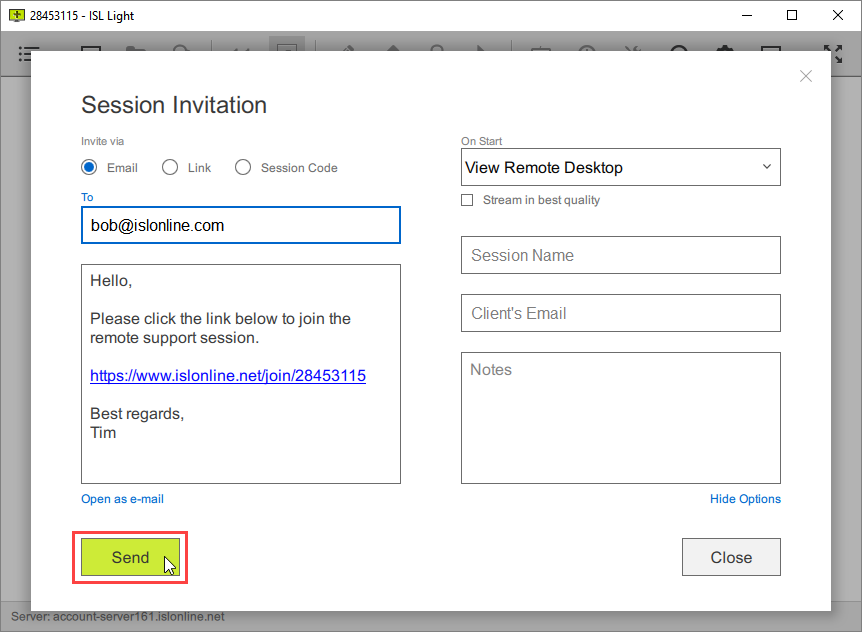
Provide a customers email and click "Send". Once the client side runs the "Session Invitation" link on his computer, you will be connected.
Step 5

You may now control the remote computer.
Related Articles:
Set Unattended Access via Email